Icon of program: Take Command

Take Command for Windows

  • Trial version
  • 0.5
    4
  • 563
  • V35.0.21.0
Download for Windows

View an ad to download for free

Command line power and GUI ease of use

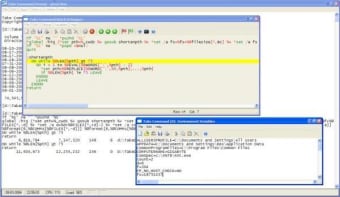
Using Windows Command tool is still a very basic experience. It's one of the few aspects that has never really been revamped by Microsoft. Take Command is an enhanced command tool which supports all the same commands available in the original but many more. These include, command line editing, aliases for frequently used commands, new and enhanced commands, batch file programming enhancements, third-party plugins, and much more, Most importantly however, it's presented in a fully graphical GUI that you expect from Windows.

Top Recommended Alternative

This means it features a graphical environment like pull-down menus, dialogs, application controls, and cut and paste support. This makes life so much easier than having to know all the commands which most basic PC users don't. You can simply use your mouse to execute commands in the way you do with any other Windows application.

This is a brilliant enhancement to Windows command tool that should be standard in Windows.
  • Pros

    • Adds a GUI to Windows command tool
    • Eliminates the need to know commands
  • Cons

    • Doesn't extend functions far enough
 0/1

App specs

Program available in other languages


Icon of program: Take Command

Take Command for PC

  • Trial version
  • 0.5
    4
  • 563
  • V35.0.21.0
Download for PC

View an ad to download for free


User reviews about Take Command

Have you tried Take Command? Be the first to leave your opinion!

Add review

You may also like

Alternatives to Take Command

Explore Apps

Latest articles

Laws concerning the use of this software vary from country to country. We do not encourage or condone the use of this program if it is in violation of these laws.
Softonic

Is Take Command safe?

100/100

Score result: Clean

This file passed a comprehensive security scan using VirusTotal technology. It is safe to download.

  • Virus free
  • Spyware free
  • Malware free
  • Verified by Security Partners

    VirusTotal logo

Scan Info

Last scan
Tuesday, July 14, 2026
Scan provider
VirusTotal · Full report

File Integrity

File
Take_Command_V35.0.21.0.exe
SHA256
0e647f89d63dbbad82d559c620c184b10e065597905000eb441ad90b59e02b75
SHA1
306100d7ae3aad928c1cde4770c1a3c41ee7dfbc

Softonic security commitment

Take Command has been thoroughly scanned by our advanced security systems and verified by industry-leading partners. This file comes from the official developer and has passed all our security checks, showing no signs of viruses, malware, or spyware. For more information, visit our Security and Trust Center

Signed in to Softonic as